Overview:
The Mitel/ShorTel physical phone can be set up for use from home with a few simple steps. Once properly setup your phone will work as on the Sinclair campus.
Hardware Needed:
- 3 Ethernet cables
- 1 VOIP POE Power Injector
- 1 ShoreTel/Mitel Phone (400 series only)
- 1 PC/Laptop
- 1 Desk Phone Headset (OPTIONAL)
Hardware Set Up:
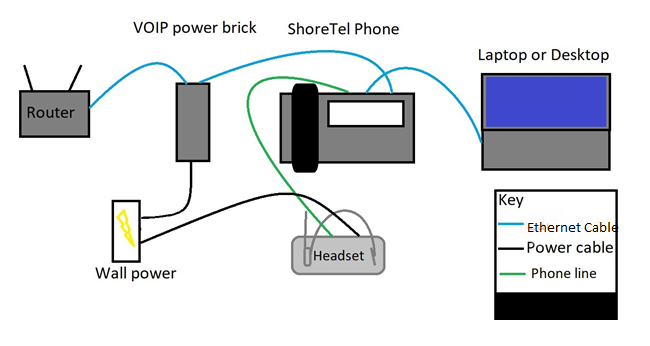
- Plug one end of the Ethernet cable into your home router/switch and the other end into the VOIP POE Injector port labeled “Data In”
- Plug one end of the second Ethernet cable into the VOIP POE Injector port labeled “Data & Power Out”. The second end of the Ethernet cable will be plugged into the phone, but - *Please see software steps below before plugging in the phone
- Finally, take the third Ethernet cable, plug it into the second port on the phone (Keyboard and Monitor Icon) to allow for a wired PC or Laptop connection.
Software Set Up:
- Once the phone is plugged in on step 2, it will start a boot up process and say Mitel with a loading bar
- The next screen will start a countdown from 5. Press any key before the time expires to take you into the boot menu.
- If you did not get into this menu, unplug the phone and re-plug it in to try again
- Enter Admin Password 1234 and press OK.
- Scroll down to VPN and press Open.
- Highlight Use VPN and press toggle to enable.
- Scroll down to VPN gateway and enter 140.106.48.173 using the star key for periods
- Press the Back button.
- Press the Apply button.
- If you have never logged into the phone it will prompt you for your extension number and voicemail pin
Testing:
- Call any internal number. X4357 is a good test. If you are prompted to press a button, internal calls are working.
- Then try to call any external number (example your cell number) to verify external calls are working.
If the phone does not come up properly, please call the help desk at x4558. We will need your external IP address while troubleshooting. You can find this at https://whatismyipaddress.com/ - we will need the IPv4 address.
Returning To Campus:
When returning to campus to work, temporarily or permanent, please use the following instructions.
- Once the phone is plugged in it will start a boot up process. It will say Mitel with a loading bar.
- The next screen will start a countdown from 5, press any key before the time expires to take you into the boot menu.
- If you did not get into this menu, unplug the phone and re-plug it in to try again
- Enter Admin Password 1234 and press OK.
- Scroll down to VPN and press Open.
- Highlight Use VPN and press toggle to disabled.
- Press the Back button.
- Press the Apply button.
Sample Setup: